Jira Integration
A finding is only fixed once it reaches the team that owns the fix. Connect Jira once and every issue, zone and brand finding can become a ticket in the project your team already works from.
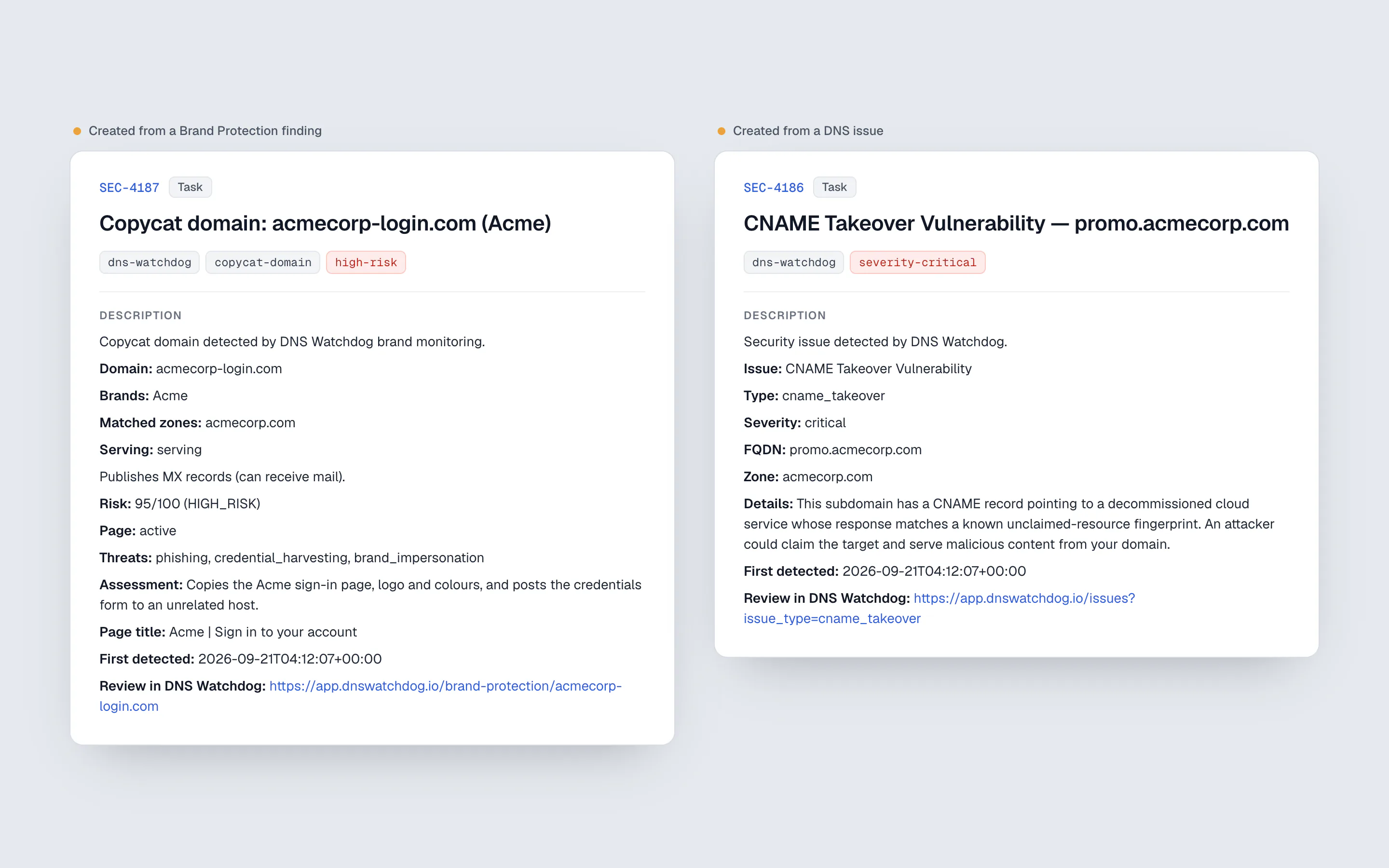
Findings that live only in a security tool wait for someone to copy them somewhere else. DNS Watchdog connects to Jira Cloud so the handover is one click: every issues table, the zones table and the Brand Protection list gain a Jira column that creates a ticket, or links to the one that already exists.
Tickets arrive filled in. A brand finding carries the domain, the brands it trades on, the risk score and threat types with the model's reasoning, the page title and a link back, and is labelled with its risk band. The ticket key is stored on the finding and survives rescans, so detecting the same problem again never loses the link.
Setup is a short wizard that checks each step against Jira before anything is saved: the credentials, then a project the account can actually create issues in, then the issue type. A connection that cannot create tickets is never stored. The API token is the only secret, and a dedicated account that can create issues in one project and nothing more is all it needs.
How it works
- ConnectEnter your Jira Cloud site, account email and API token. DNS Watchdog checks them against Jira before going any further.
- ChoosePick a project and issue type from the ones the account can create. Projects it cannot write to are shown but cannot be selected.
- CreateA Create action appears in the Jira column of every issues table, the zones table and the Brand Protection list.
- TrackThe ticket key links the finding to Jira and is kept through every rescan.
What you get
- Jira Cloud, connected with an API token that is checked before it is saved
- One-click tickets from issues, zones and brand findings
- Brand findings pre-filled with the risk score, threat types, reasoning and labels
- Ticket links stored on the finding and kept across rescans
- A Jira column in every issues table, the zones table and the Brand Protection list
- Disconnecting deletes the token and keeps existing links
Why it matters
From finding to owner in one click
No copying details between tabs. The ticket lands in the project your team already triages, with everything needed to act on it.
Nothing lost between tools
Each finding shows its ticket, so anyone can see what is already being worked on and what is not.
Least privilege by design
The integration only ever creates issues, so an account that can create issues in one project is enough, and a leaked token could do nothing more.
Works for the brand team too
The Brand Protection role can raise tickets for brand findings without access to anything else in the product.
FAQ
Which Jira editions are supported?
Jira Cloud, through its REST API with an account email and API token.
What permissions does the Jira account need?
Permission to create issues in the chosen project. A dedicated service account with that one permission is the safest setup.
Does DNS Watchdog update or close tickets?
No. It creates the ticket and keeps the link; the ticket's workflow stays in Jira.